Checkout
With PagaSul, you can accept payments by redirecting customers to our hosted checkout page. Your server creates a payment request, receives a checkout URL, and sends the customer there.
Here is a step-by-step description of the payment processing flow with the checkout.
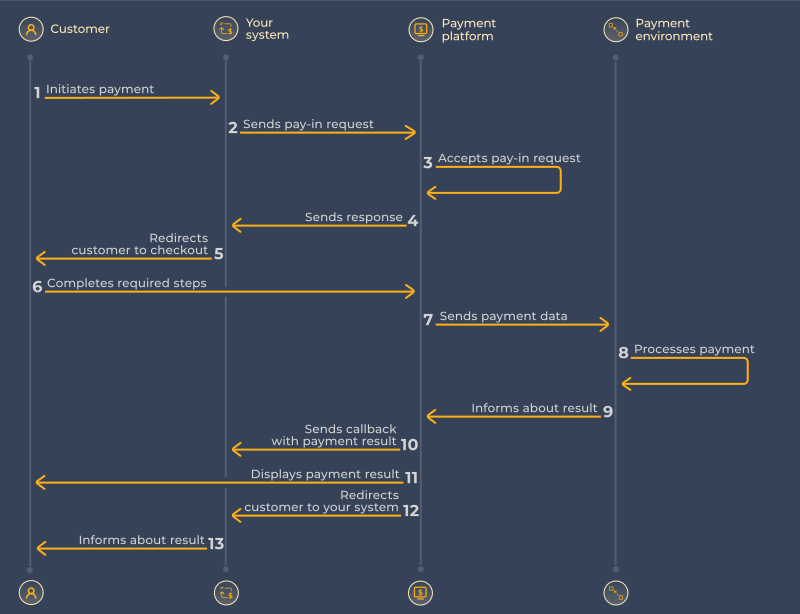
How to integrate
1. Create a pay-in
Send a POST request to /v2/pay-in. Include a signature in the header.
curl -X POST https://api.pagasul.com/v2/pay-in \
  -H "Content-Type: application/json" \
  -H "signature: <calculated>" \
  -d '{
    "client_id": 123,
    "client_payment_id": "order_42",
    "amount": 150.00,
    "currency": "BRL",
    "payer": {
      "id": "user_1234"
    },
    "payment_options": {
      "callback_url": "https://your-site.com/webhook",
      "return_url": "https://your-site.com/thank-you"
    }
  }'
client_payment_id must be unique per payment in your system — it is used for idempotency.
To preselect a payment method, pass payment_method (e.g. "BR.PIX"). Without it, the customer chooses on the checkout page. See Payment Methods for available codes and any additional required fields per method.
Full parameter list
| Parameter | Type | Required | Description |
|---|---|---|---|
| client_id | integer | Yes | Your account identifier, provided upon integration |
| client_payment_id | string | Yes | Your payment ID, must be unique to the client_id used |
| payment_method | string | Optional | Preselected payment method code (see Supported payment methods section). If not passed, the customer will be presented with a form to select a method from those connected on your client_id |
| currency | string | Yes | Payment currency (see Supported payment methods section) |
| amount | decimal | Yes | Requested payment amount (for example: pass 12.34 for 12 dollars 34 cents amount) |
| payer | object | Optional | Customer data section |
| payer.id | string | Yes | A unique identifier for a customer or customer account on your side. It is used to accumulate customer data and for anti-fraud protection |
| payer.is_trusted | boolean | Optional | If passed and "true" customer marked as trusted (for use please consult Pagasul representative) |
| payer.name | string | Optional | Customer name |
| payer.email | string | Optional | Customer email |
| payer.country | string | Optional | Customer country (alpha-2 code) |
| payer.state | string | Optional | Customer state |
| payer.city | string | Optional | Customer city |
| payer.address | string | Optional | Customer address |
| payer.phone | string | Optional | Customer phone |
| payer.language | string | Optional | Preferred language for customer |
| payer.cpf | string | Optional | Customer CPF (Cadastro de Pessoas Físicas) for Brazil payment methods. Can be passed in following formats: "231.002.999-00" or "23100299900" |
| payer.cuit | string | Optional | Customer CUIT (Unique Tax Identification Code) for Argentina payment methods. Can be passed in following formats: "30-69330706-2" or "30693307062" |
| payer.citizenship_card | string | Optional | Number of the Citizenship Card (Cédula de Ciudadanía) for Colombian/Ecuadorian payment methods |
| payer.nit | string | Optional | Unique Taxpayer Number (Número de Identificación Tributaria) for Colombian/Bolivian payment methods |
| payer.pas | string | Optional | Passport needed for Bolivian/Ecuadorian payment methods |
| payer.ce | string | Optional | Customer Identity card of Foreigners (Cédula de Extranjería) for Colombian payment methods |
| payer.ti | string | Optional | Customer identity document (Tarjeta de Identidad) for Colombian payment methods |
| payer.ci | string | Optional | Customer identity document (Cédula de Identidad) for Bolivia/Venezuela payment methods. For Venezuela it must start with letter V or E |
| payer.ruc | string | Optional | Ecuadorian taxpayer number (Registro Único de Contribuyente) |
| payer_account | object | Optional | Customer account data section |
| payer_account.bank_code | string | Optional | Payer bank code (Mandatoriness see in section Supported payment methods). One of bank code from list (see Bank Codes section) |
| payment_options | string | Optional | Optional section for extra parameters used for payment flow adjustment |
| payment_options.return_url | string | Optional | If passed, the customer will be returned to the specified URL after the payment is completed |
| payment_options.callback_url | string | Optional | If passed, the notification on payment status change will be sent to the specified URL |
| payment_options.reclaim_client_payment_id | string | Optional | Please, consult Pagasul representative about using this parameter |
| payment_extra_param | string | Optional | Please, contact to your manager for possible parameter values and purpose |
Also the full parameter list, see Create pay-in in the API Reference.
2. Redirect the customer
A successful request returns a 200 response with status: "redirect" and a checkout URL:
{
  "payment_id": 246001234,
  "status": "redirect",
  "checkout_data": {
    "method": "GET",
    "url": "https://checkout.pagasul.com/pay?..."
  }
}
Redirect the customer to checkout_data.url using the HTTP method in checkout_data.method. Store the payment_id — you'll need it to correlate callbacks.
For the full response structure, see Response.
3. Handle the callback
When the payment is completed, PagaSul sends a POST to your callback_url. Verify the signature in the header, then check the status field:
| Status | Meaning | Action |
|---|---|---|
success | Payment completed | Fulfil the order |
decline | Payment declined | Notify the customer |
failed | Processing error | Contact PagaSul support |
For all statuses and result codes, see Statuses & Codes. For the full callback structure, see Callbacks.
4. Return the customer
After checkout, PagaSul redirects the customer to your return_url. Use it to display a confirmation page. Do not use this redirect to determine payment outcome — use the callback for that.