Payment API Integration Guides
Get Started
To start accepting payments with PagaSul, make sure you have:
- Account ID and secret key — provided by PagaSul during onboarding
- Signature generation — all API requests require an HMAC-SHA512 signature; see Signature
- Callback endpoint — a URL on your server that accepts
POSTrequests; PagaSul notifies it on every payment status change
Monitor and manage your payments in the PagaSul Dashboard. Contact your key account manager to get access.
Choose your integration
| Guide | When to use |
|---|---|
| Checkout | You redirect customers to PagaSul's hosted payment page |
| Payment Link | You send customers a ready-made URL — no server-side API call needed |
| Strict H2H flow | You show payment details on your own page — fetched via /v2/status after the pay-in |
| Payout | You send money to customers' bank accounts or Pix keys |
All flows share the same response and callback format. Read Responses and Callbacks to understand what your server needs to handle.
For the payment methods available in each country, see Payment methods.
Checkout
With PagaSul, you can accept payments by redirecting customers to our hosted checkout page. Your server creates a payment request, receives a checkout URL, and sends the customer there.
Here is a step-by-step description of the payment processing flow with the checkout.
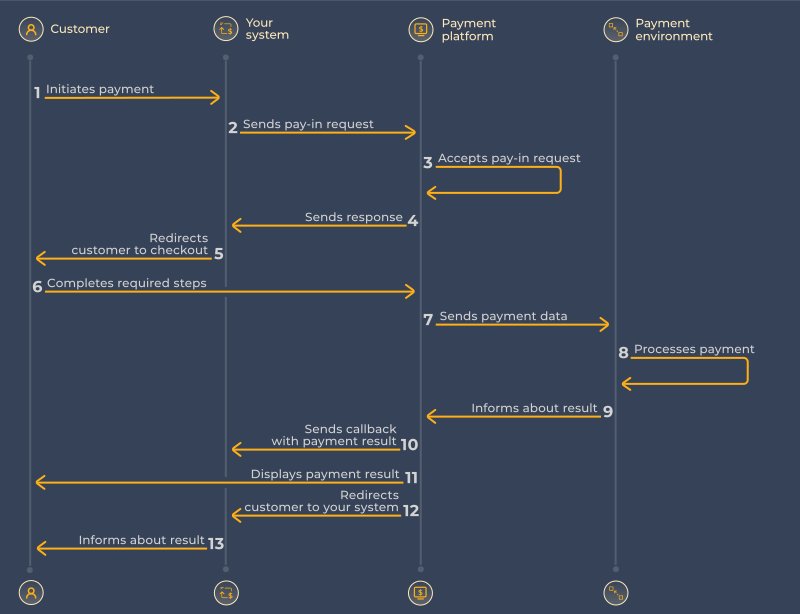
1. Create a pay-in
Send a POST request to /v2/pay-in. Include a signature in the header.
curl -X POST https://api.pagasul.com/v2/pay-in \
  -H "Content-Type: application/json" \
  -H "signature: <calculated>" \
  -d '{
    "client_id": 123,
    "client_payment_id": "order_42",
    "amount": 150.00,
    "currency": "BRL",
    "payer": {
      "id": "user_1234"
    },
    "payment_options": {
      "callback_url": "https://your-site.com/webhook",
      "return_url": "https://your-site.com/thank-you"
    }
  }'
client_payment_id must be unique per payment in your system — it is used for idempotency.
To preselect a payment method, pass payment_method (e.g. "BR.PIX"). Without it, the customer chooses on the checkout page. See Payment Methods for available codes and any additional required fields per method.
Full parameter list
| Parameter | Type | Required | Description |
|---|---|---|---|
| client_id | integer | Yes | Your account identifier, provided upon integration |
| client_payment_id | string | Yes | Your payment ID, must be unique to the client_id used |
| payment_method | string | Optional | Preselected payment method code (see Supported payment methods section). If not passed, the customer will be presented with a form to select a method from those connected on your client_id |
| currency | string | Yes | Payment currency (see Supported payment methods section) |
| amount | decimal | Yes | Requested payment amount (for example: pass 12.34 for 12 dollars 34 cents amount) |
| payer | object | Optional | Customer data section |
| payer.id | string | Yes | A unique identifier for a customer or customer account on your side. It is used to accumulate customer data and for anti-fraud protection |
| payer.is_trusted | boolean | Optional | If passed and "true" customer marked as trusted (for use please consult Pagasul representative) |
| payer.name | string | Optional | Customer name |
| payer.email | string | Optional | Customer email |
| payer.country | string | Optional | Customer country (alpha-2 code) |
| payer.state | string | Optional | Customer state |
| payer.city | string | Optional | Customer city |
| payer.address | string | Optional | Customer address |
| payer.phone | string | Optional | Customer phone |
| payer.language | string | Optional | Preferred language for customer |
| payer.cpf | string | Optional | Customer CPF (Cadastro de Pessoas Físicas) for Brazil payment methods. Can be passed in following formats: "231.002.999-00" or "23100299900" |
| payer.cuit | string | Optional | Customer CUIT (Unique Tax Identification Code) for Argentina payment methods. Can be passed in following formats: "30-69330706-2" or "30693307062" |
| payer.citizenship_card | string | Optional | Number of the Citizenship Card (Cédula de Ciudadanía) for Colombian/Ecuadorian payment methods |
| payer.nit | string | Optional | Unique Taxpayer Number (Número de Identificación Tributaria) for Colombian/Bolivian payment methods |
| payer.pas | string | Optional | Passport needed for Bolivian/Ecuadorian payment methods |
| payer.ce | string | Optional | Customer Identity card of Foreigners (Cédula de Extranjería) for Colombian payment methods |
| payer.ti | string | Optional | Customer identity document (Tarjeta de Identidad) for Colombian payment methods |
| payer.ci | string | Optional | Customer identity document (Cédula de Identidad) for Bolivia/Venezuela payment methods. For Venezuela it must start with letter V or E |
| payer.ruc | string | Optional | Ecuadorian taxpayer number (Registro Único de Contribuyente) |
| payer_account | object | Optional | Customer account data section |
| payer_account.bank_code | string | Optional | Payer bank code (Mandatoriness see in section Supported payment methods). One of bank code from list (see Bank Codes section) |
| payment_options | string | Optional | Optional section for extra parameters used for payment flow adjustment |
| payment_options.return_url | string | Optional | If passed, the customer will be returned to the specified URL after the payment is completed |
| payment_options.callback_url | string | Optional | If passed, the notification on payment status change will be sent to the specified URL |
| payment_options.reclaim_client_payment_id | string | Optional | Please, consult Pagasul representative about using this parameter |
| payment_extra_param | string | Optional | Please, contact to your manager for possible parameter values and purpose |
Also the full parameter list, see Create pay-in in the API Reference.
2. Redirect the customer
A successful request returns a 200 response with status: "redirect" and a checkout URL:
{
  "payment_id": 246001234,
  "status": "redirect",
  "checkout_data": {
    "method": "GET",
    "url": "https://checkout.pagasul.com/pay?..."
  }
}
Redirect the customer to checkout_data.url using the HTTP method in checkout_data.method. Store the payment_id — you'll need it to correlate callbacks.
For the full response structure, see Response.
3. Handle the callback
When the payment is completed, PagaSul sends a POST to your callback_url. Verify the signature in the header, then check the status field:
| Status | Meaning | Action |
|---|---|---|
success | Payment completed | Fulfil the order |
decline | Payment declined | Notify the customer |
failed | Processing error | Contact PagaSul support |
For all statuses and result codes, see Statuses & Codes. For the full callback structure, see Callbacks.
4. Return the customer
After checkout, PagaSul redirects the customer to your return_url. Use it to display a confirmation page. Do not use this redirect to determine payment outcome — use the callback for that.
Payment Link
With PagaSul, you can accept payments by sharing a link directly with your customer. No server-to-server API call is needed — the link is a URL with payment parameters in the query string. When the customer follows it, PagaSul renders the hosted checkout.
Here is a step-by-step description of the payment processing flow with the payment link.
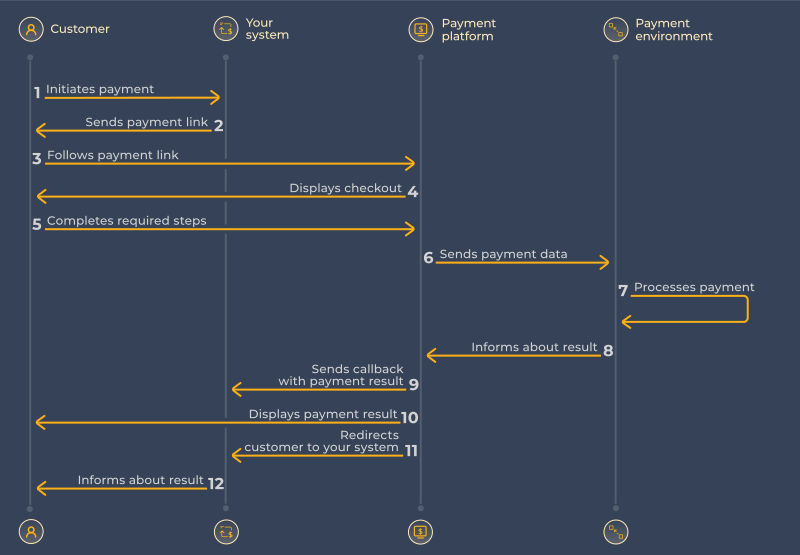
1. Build the payment link
Construct a URL to https://checkout.pagasul.com/pay with your payment parameters as a query string. You can do this on the server or the client.
https://checkout.pagasul.com/pay
?client_id=123
&client_payment_id=order_42
&amount=150.00
¤cy=BRL
&payer.id=user_1234
&callback_url=https%3A%2F%2Fyour-site.com%2Fwebhook
&payment_options.return_url=https%3A%2F%2Fyour-site.com%2Fthank-you
client_payment_id must be unique per payment in your system — it is used for idempotency.
To preselect a payment method, include payment_method=BR.PIX (or another code). Without it, the customer chooses on the checkout page. See Payment Methods for available codes and any additional required fields per method.
Full parameter list
| Parameter | Type | Required | Description |
|---|---|---|---|
| client_id | integer | Yes | Your account identifier, provided upon integration |
| client_payment_id | string | Yes | Your payment ID, must be unique to the client_id used |
| payment_method | string | Optional | Preselected payment method code (see Supported payment methods section). If not passed, the customer will be presented with a form to select a method from those connected on your client_id |
| currency | string | Yes | Payment currency (see Supported payment methods section) |
| amount | decimal | Yes | Requested payment amount (for example: pass 12.34 for 12 dollars 34 cents amount) |
| payer.id | string | Yes | A unique identifier for a customer or customer account on your side. It is used to accumulate customer data and for anti-fraud protection |
| payer.is_trusted | boolean | Optional | If passed and "true" customer marked as trusted (for use please consult Pagasul representative) |
| payer.name | string | Optional | Customer name |
| payer.email | string | Optional | Customer email |
| payer.country | string | Optional | Customer country (alpha-2 code) |
| payer.state | string | Optional | Customer state |
| payer.city | string | Optional | Customer city |
| payer.address | string | Optional | Customer address |
| payer.phone | string | Optional | Customer phone |
| payer.language | string | Optional | Preferred language for customer |
| payer.cpf | string | Optional | Customer CPF (Cadastro de Pessoas Físicas) for Brazil payment methods. Can be passed in following formats: "231.002.999-00" or "23100299900" |
| payer.cuit | string | Optional | Customer CUIT (Unique Tax Identification Code) for Argentina payment methods. Can be passed in following formats: "30-69330706-2" or "30693307062" |
| payer.citizenship_card | string | Optional | Number of the Citizenship Card (Cédula de Ciudadanía) for Colombian/Ecuadorian payment methods |
| payer.nit | string | Optional | Unique Taxpayer Number (Número de Identificación Tributaria) for Colombian/Bolivian payment methods |
| payer.pas | string | Optional | Passport needed for Bolivian/Ecuadorian payment methods |
| payer.ce | string | Optional | Customer Identity card of Foreigners (Cédula de Extranjería) for Colombian payment methods |
| payer.ti | string | Optional | Customer identity document (Tarjeta de Identidad) for Colombian payment methods |
| payer.ci | string | Optional | Customer identity document (Cédula de Identidad) for Bolivia/Venezuela payment methods. For Venezuela it must start with letter V or E |
| payer.ruc | string | Optional | Ecuadorian taxpayer number (Registro Único de Contribuyente) |
| payer_account | object | Optional | Customer account data section |
| payer_account.bank_code | string | Optional | Payer bank code (Mandatoriness see in section Supported payment methods). One of bank code from list (see Bank Codes section) |
| payment_options.return_url | string | Optional | If passed, the customer will be returned to the specified URL after the payment is completed |
| payment_options.callback_url | string | Optional | If passed, the notification on payment status change will be sent to the specified URL |
Also the full parameter list see Create payment link in the Reference.
2. Share the link
Send the link to your customer via email, SMS, or embed it as a button in your UI. When the customer follows it, PagaSul opens the checkout page.
3. Handle the callback
When the payment is completed, PagaSul sends a POST to your callback_url. Verify the signature in the header, then check the status field:
| Status | Meaning | Action |
|---|---|---|
success | Payment completed | Fulfil the order |
decline | Payment declined | Notify the customer |
failed | Processing error | Contact PagaSul support |
For all statuses and result codes, see Statuses & Codes. For the full callback structure, see Callbacks.
4. Return the customer
After checkout, PagaSul redirects the customer to payment_options.return_url. Use it to display a confirmation page. Do not use this redirect to determine payment outcome — use the callback for that.
Strict H2H flow
With PagaSul, you can accept payments by redirecting customers to your own checkout page or redirect customer to given URL.
1. Create a pay-in
Send a POST request to /v2/pay-in. Include a signature in the header.
curl -X POST https://api.pagasul.com/v2/pay-in \
  -H "Content-Type: application/json" \
  -H "signature: <calculated>" \
  -d '{
    "client_id": 123,
    "client_payment_id": "order_42",
    "amount": 150.00,
    "currency": "BRL",
    "payer": {
      "id": "user_1234"
    },
    "payment_options": {
      "callback_url": "https://your-site.com/webhook",
      "return_url": "https://your-site.com/thank-you"
    }
  }'
client_payment_id must be unique per payment in your system — it is used for idempotency.
To preselect a payment method, pass payment_method (e.g. "BR.PIX"). Without it, the customer chooses on the checkout page. See Payment Methods for available codes and any additional required fields per method.
Full parameter list
| Parameter | Type | Required | Description |
|---|---|---|---|
| client_id | integer | Yes | Your account identifier, provided upon integration |
| client_payment_id | string | Yes | Your payment ID, must be unique to the client_id used |
| payment_method | string | Yes | Preselected payment method code (see Supported payment methods section) |
| currency | string | Yes | Payment currency (see Supported payment methods section) |
| amount | decimal | Yes | Requested payment amount (for example: pass 12.34 for 12 dollars 34 cents amount) |
| payer | object | Optional | Customer data section |
| payer.id | string | Yes | A unique identifier for a customer or customer account on your side. It is used to accumulate customer data and for anti-fraud protection |
| payer.is_trusted | boolean | Optional | If passed and "true" customer marked as trusted (for use please consult Pagasul representative) |
| payer.name | string | Optional | Customer name |
| payer.email | string | Optional | Customer email |
| payer.country | string | Optional | Customer country (alpha-2 code) |
| payer.state | string | Optional | Customer state |
| payer.city | string | Optional | Customer city |
| payer.address | string | Optional | Customer address |
| payer.phone | string | Optional | Customer phone |
| payer.language | string | Optional | Preferred language for customer |
| payer.cpf | string | Optional | Customer CPF (Cadastro de Pessoas Físicas) for Brazil payment methods. Can be passed in following formats: "231.002.999-00" or "23100299900" |
| payer.cuit | string | Optional | Customer CUIT (Unique Tax Identification Code) for Argentina payment methods. Can be passed in following formats: "30-69330706-2" or "30693307062" |
| payer.citizenship_card | string | Optional | Number of the Citizenship Card (Cédula de Ciudadanía) for Colombian/Ecuadorian payment methods |
| payer.nit | string | Optional | Unique Taxpayer Number (Número de Identificación Tributaria) for Colombian/Bolivian payment methods |
| payer.pas | string | Optional | Passport needed for Bolivian/Ecuadorian payment methods |
| payer.ce | string | Optional | Customer Identity card of Foreigners (Cédula de Extranjería) for Colombian payment methods |
| payer.ti | string | Optional | Customer identity document (Tarjeta de Identidad) for Colombian payment methods |
| payer.ci | string | Optional | Customer identity document (Cédula de Identidad) for Bolivia/Venezuela payment methods. For Venezuela it must start with letter V or E |
| payer.ruc | string | Optional | Ecuadorian taxpayer number (Registro Único de Contribuyente) |
| payer_account | object | Optional | Customer account data section |
| payer_account.bank_code | string | Optional | Payer bank code (Mandatoriness see in section Supported payment methods). One of bank code from list (see Bank Codes section) |
| payment_options | string | Optional | Optional section for extra parameters used for payment flow adjustment |
| payment_options.return_url | string | Optional | If passed, the customer will be returned to the specified URL after the payment is completed |
| payment_options.callback_url | string | Optional | If passed, the notification on payment status change will be sent to the specified URL |
| payment_options.reclaim_client_payment_id | string | Optional | Please, consult Pagasul representative about using this parameter |
| payment_extra_param | string | Optional | Please, contact to your manager for possible parameter values and purpose |
Also the full parameter list, see Create pay-in in the API Reference.
2. Show to customer loader
A successful request returns a 200 response with status: "processing":
Pay-in init response
'{
  "client_id": 111,
  "client_payment_id": "test_payment_00123",
  "payment_type": "pay-in",
  "payment_id": 301150550709,
  "payment_method": "BR.PIX",
  "currency": "USD",
  "amount": 192.21,
  "status": "processing",
  "result_code": "0",
  "result_message": "payment processing"
}'
3. Get the payment details
Send a POST request to /v2/status. Include a signature in the header.
curl -X POST https://api.pagasul.com/v2/status \
  -H "Content-Type: application/json" \
  -H "signature: <calculated>" \
  -d '{
  "client_id": 123,
  "client_payment_id": "payment_35",
  "payment_id": 246001234
}'
Payment status response (redirect)
'{
  "client_id": 111,
  "client_payment_id": "test_payment_00123",
  "payment_type": "pay-in",
  "payment_id": 301150550709,
  "currency": "COP",
  "amount": 192.21,
  "status": "redirect",
  "redirect_data": {
    "method": "GET",
    "url": "https://checkout.pagasul.com/checkout/a6e28417-5e29-11ef-a876-fa163e25c64d"
},
  "result_code": "OK",
  "result_message": "payment processing"
}'
Data contained in “payment_data” section must be used to display payment instruction to customer on your side. This section will become available upon receiving “pay pending” status. You can refer our checkout as implementation example.
Data contained in “redirect_data” section must be used to redirect customer to given URL. This section will become available upon receiving “redirect” status. You can refer our checkout as implementation example.
Also callback will be sent upon “pay pending” or “redirect” status. Callback is completely follows the structure and parameters of the status response.
Response full parameter list
| Parameter | Type | Required | Description |
|---|---|---|---|
| client_id | integer | Yes | Your account identifier, provided upon integration |
| client_payment_id | string | Yes | Your payment ID |
| payment_id | Unsigned big integer | Yes | Payment ID on our system |
| payment_type | string | Yes | Payment direction ("pay-in") |
| payment_method | string | Optional | Payment method code (see Supported payment methods section). |
| currency | string | Yes | Payment currency (see Supported payment methods section) |
| amount | decimal | Yes | Payment amount (for example: pass 12.34 for 12 dollars 34 cents amount) |
| status | string | Yes | Payment status (see Payment status model) |
| result_code | string | Yes | Internal result code |
| result_message | string | Yes | Extended description of result |
| payment_data | object | Optional | Section is available for strict H2H only |
| payment_data.qr_data | string | Conditional | String with must be encoded to QR image |
| payment_data.bank_name | string | Conditional | Receiver bank name for payment instruction |
| payment_data.receiver_name | string | Conditional | Receiver name for payment instruction |
| payment_data.receiver_phone | string | Conditional | Receiver phone number for payment instruction |
| payment_data.receiver_doc | string | Conditional | Receiver document for payment instruction |
| payment_data.receiver_account | string | Conditional | Receiver account for payment instruction |
| payment_data.selected_amount | string | Conditional | Amount needs to be transferred by customer to complete payment |
| payment_data.amounts | Array of decimal | Conditional | In case of requested amount is currently unavailable we sends a set of available amounts. We suggest to allow customer to choose one of them and make a transfer of it. (No need to send us selected amount back for now. But for a best user experience please force customer to choose one of them before displaying payment receiver account) |
| redirect_data | object | Optional | Section is available for strict H2H only |
| redirect_data.url | string | Conditional | URL for customer redirect (CO.BT and CO.PSE) |
| redirect_data.method | string | Conditional | HTTP method for customer redirect (CO.BT and CO.PSE) |
4. Handle the callback
When the payment is completed, PagaSul sends a POST to your callback_url. Verify the signature in the header, then check the status field:
| Status | Meaning | Action |
|---|---|---|
success | Payment completed | Fulfil the order |
decline | Payment declined | Notify the customer |
failed | Processing error | Contact PagaSul support |
For all statuses and result codes, see Statuses & Codes. For the full callback structure, see Callbacks.
5. Show payment resalt
After receiving the final status, display the page with the payment result for the user.
Payout
With PagaSul, you can send money directly to your customers' bank accounts or Pix keys.
Here is a step-by-step description of the payout processing flow in PagaSul.
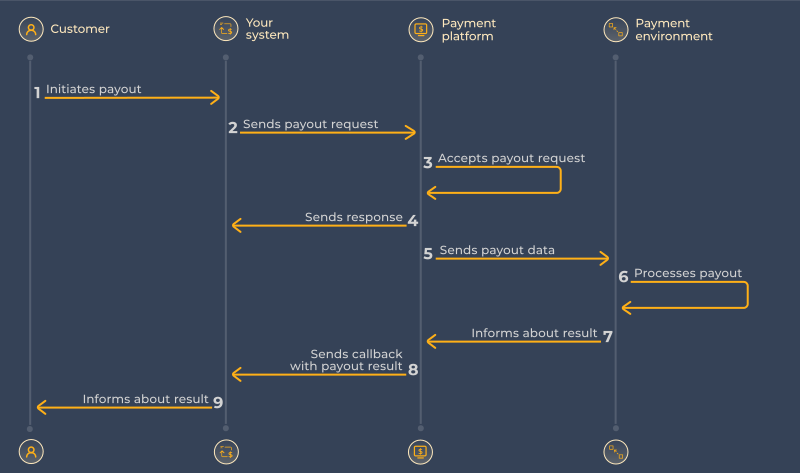
1. Create a pay-out
Send a POST request to /v2/pay-out. Include a signature in the header, and specify the payment method and the beneficiary's account details.
curl -X POST https://api.pagasul.com/v2/pay-out \
  -H "Content-Type: application/json" \
  -H "signature: <calculated>" \
  -d '{
    "client_id": 123,
    "client_payment_id": "payout_42",
    "amount": 150.00,
    "currency": "BRL",
    "payment_method": "BR.PIX",
    "payee": {
      "id": "user_1234",
      "cpf": "231.002.999-00"
    },
    "payee_account": {
      "pix_key": "johndoe@example.com",
      "pix_key_type": "EMAIL"
    },
    "payment_options": {
      "callback_url": "https://your-site.com/webhook"
    }
  }'
client_payment_id must be unique per payment in your system — it is used for idempotency.
The required payee_account fields depend on the payment method. For example, a Colombian bank transfer requires payee_account.number, payee_account.account_type, and payee_account.bank_code. See Payment Methods for the exact requirements per method, and Bank List for valid bank_code values.
Full parameter list
| Parameter | Type | Required | Description |
|---|---|---|---|
| client_id | integer | Yes | Your account identifier, provided upon integration |
| client_payment_id | string | Yes | Your payment ID, must be unique to the client_id used |
| payment_method | string | Yes | Selected payment method code (see Supported payment methods section) |
| currency | string | Yes | Payment currency (see Supported payment methods section) |
| amount | decimal | Yes | Requested payment amount (for example: pass 12.34 for 12 dollars 34 cents amount) |
| payee | object | Yes | Customer data section |
| payee.id | string | Yes | A unique identifier for a customer or customer account on your side. It is used to accumulate customer data and for anti-fraud protection |
| payee.is_trusted | boolean | Optional | If passed and "true" customer marked as trusted (for use please consult Pagasul representative) |
| payee.name | string | Optional | Customer name |
| payee.email | string | Optional | Customer email |
| payee.country | string | Optional | Customer country (alpha-2 code) |
| payee.state | string | Optional | Customer state |
| payee.city | string | Optional | Customer city |
| payee.address | string | Optional | Customer address |
| payee.phone | string | Optional | Customer phone |
| payee.language | string | Optional | Preferred language for customer |
| payee.cpf | string | Optional | Customer CPF (Cadastro de Pessoas Físicas) for Brazil payment methods. Can be passed in following formats: "231.002.999-00" or "23100299900" |
| payee.cuit | string | Optional | Customer CUIT (Unique Tax Identification Code) for Argentina payment methods. Can be passed in following formats: "30-69330706-2" or "30693307062" |
| payee.citizenship_card | string | Conditional | Number of the Citizenship Card (Cédula de Ciudadanía) for Colombian/Ecuadorian payment methods |
| payee.nit | string | Conditional | Unique Taxpayer Number (Número de Identificación Tributaria) for Colombian/Bolivian payment methods |
| payee.pas | string | Optional | Passport needed for Bolivian/Ecuadorian payment methods |
| payee.ce | string | Optional | Customer Identity card of Foreigners (Cédula de Extranjería) for Colombian payment methods |
| payee.ti | string | Optional | Customer identity document (Tarjeta de Identidad) for Colombian payment methods |
| payee.ci | string | Optional | Customer identity document (Cédula de Identidad) for Bolivia/Venezuela payment methods. For Venezuela it must start with letter V or E |
| payee.ruc | string | Optional | Ecuadorian taxpayer number (Registro Único de Contribuyente) |
| payee.rif | string | Optional | Venezuela's tax number (Registro de Información Fiscal). It must start with letter V, E, P, J, G, or C |
| payee_account | object | Yes | Customer account data for payment |
| payee_account.pix_key | string | Conditional | Required for Pix method. Key for Pix account. One of the following: CPF, CNPJ, E-mail, Phone, EVP |
| payee_account.pix_key_type | string | Conditional | Required for Pix method. Type of pix key value. One of: CPF, CNPJ, EMAIL, PHONE, EVP |
| payee_account.breb_key | string | Conditional | Required for Bre-b method. Key for Bre-b account. One of the following: E-mail, Phone, ID (Cédula), Alpha-Numeric Code (user-generated alias) |
| payee_account.account_type | string | Conditional | Type of account number passed in number parameter. (Mandatoriness see in section Supported payment methods). One of: CACC, SVGS |
| payee_account.number | string | Conditional | Bank account number or mobile phone number that links to bank account (Mandatoriness see in section Supported payment methods) |
| payee_account.bank_code | string | Conditional | Payee bank code (Mandatoriness see in section Supported payment methods). One of bank code from list (see Bank Codes section) |
| payee_account.holder_name | string | Conditional | Bank account holder name. Required for Argentina bank transfers (Mercado Pago) method |
| payment_options | object | Optional | Optional section for extra parameters used for payment flow adjustment |
| payment_options.callback_url | string | Optional | If passed, the notification on payment status change will be sent to the specified URL |
| payment_extra_param | string | Optional | Please, contact to your manager for possible parameter values and purpose |
Also the full parameter list, see Create pay-out in the API Reference.
2. Handle the response
A successful request returns a 200 response with status: "new":
{
  "payment_id": 246001235,
  "status": "new",
  "result_code": "OK",
  "result_message": "payment processing"
}
Store the payment_id — you'll need it to correlate callbacks. For the full response structure, see Response.
3. Handle the callback
When the payout is processed, PagaSul sends a POST to your callback_url. Verify the signature in the header, then check the status field:
| Status | Meaning | Action |
|---|---|---|
success | Payout delivered | No action required |
decline | Payout declined | Check result_code, notify the customer |
failed | Processing error | Contact PagaSul support |
For all statuses and result codes, see Statuses & Codes. For the full callback structure, see Callbacks.